
Backups
Automatic backups of your Discord bot settings
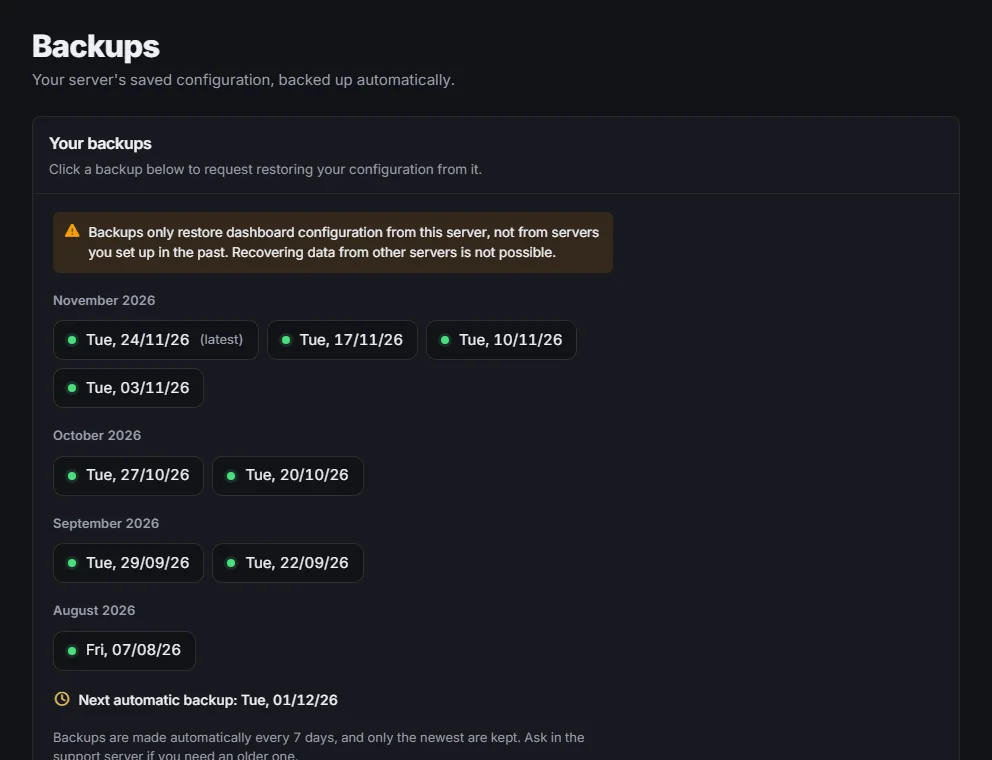
Chrysoberyl keeps copies of your dashboard settings. If something goes wrong, pick a backup and ask for the parts you need to be restored.
Free to use right now. Some features may move to a paid plan in the future.
What it can do
Automatic
Backups are made on a regular schedule without you doing anything, and the newest are kept.
Pick what comes back
Choose parts such as settings, leveling, moderation, tickets, forms, embeds or reaction roles.
Checked by a person
Restore requests go to the support team and are usually answered within 24 hours.*
*Replies may take longer over the holiday season.
This server only
A backup restores the dashboard settings of the server it was made from. It is not a copy of your channels or messages.
Set it up in three steps
Add the bot
Add Chrysoberyl to your server and set it up from the dashboard.
Open Backups
Pick the backup you want to go back to.
Request a restore
Choose what to restore, say why, and send the request.
Questions people ask
Does this back up my whole Discord server?
No. It covers Chrysoberyl's dashboard settings for your server, not channels, roles or messages.
Does restoring overwrite my current setup?
Yes, for the parts you choose to restore.
Works well with
Add Chrysoberyl to your server
Backups, moderation, leveling and more in one bot, all set up from the dashboard.