
Give a role automatically from the roles a member already has.
How it works
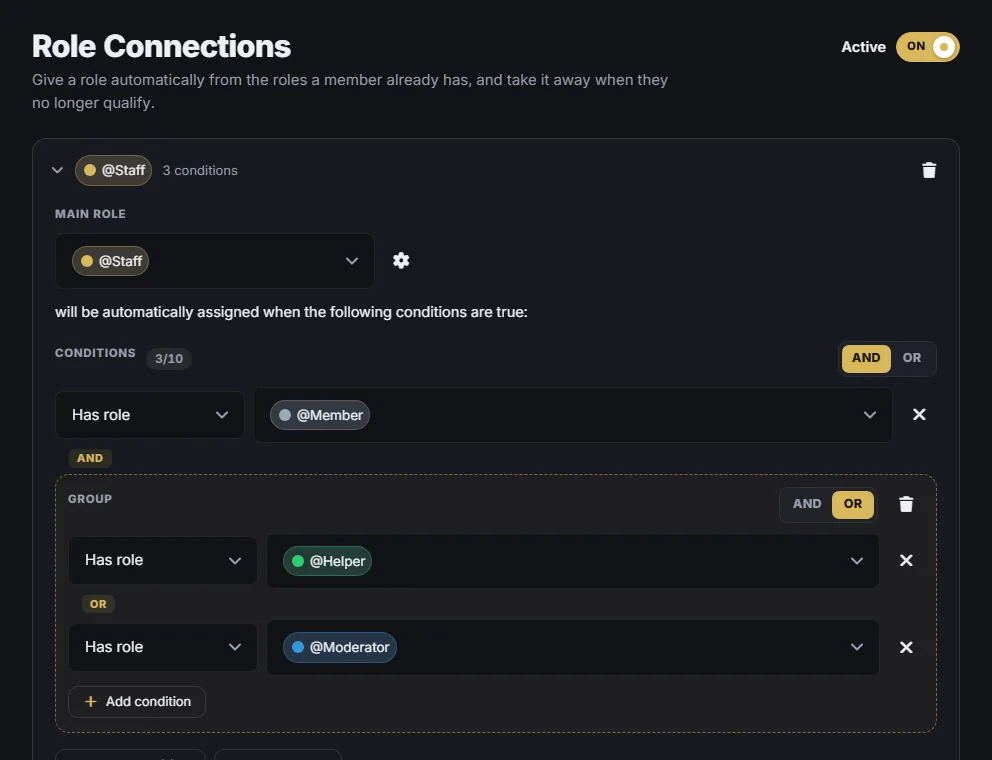
Each connection has a main role and a list of conditions. A condition is either Has role or Doesn't have role. Choose AND to need every condition, or OR for any one of them.
Add a group to mix the two, for example: has @Verified, AND (has @Gamer OR has @Streamer). A connection can have up to 10 conditions, counting the ones in groups.
When the role changes
The bot gives the main role as soon as a member matches, and takes it away when they stop matching. To let members keep the role once they have it, open the gear next to the main role and turn off Take the role away when the conditions stop being true.
After you save, existing members are updated within about a minute. New changes, like a member getting a role, apply straight away.
Good to know
- The bot's own role must be above the main role, and roles with moderator or admin permissions can't be used.
- Each role can only be the main role of one connection, and a connection can't use its own main role as a condition.
- Roles given by a connection can switch on other connections. If two connections keep undoing each other, the bot stops changing that member's roles for a moment.